




Summary
edit
| Description |
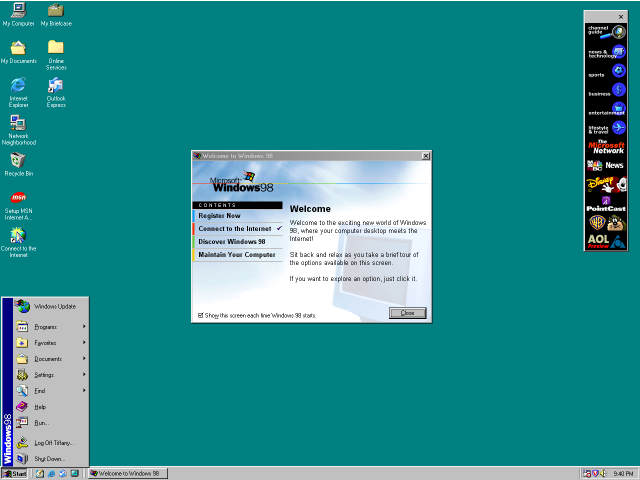
Screenshot of the Windows 98 SE desktop with the Channel Guide and Welcome to Windows 98 window open. |
|---|---|
| Source |
Original screenshot uploaded by Koman90, latest version uploaded by Addonian1123. (Source: BetaWiki) |
| Author | Microsoft |
| Portion used |
Entire screen. |
| Low resolution? |
Screenshot has been resized from 1024x768 to 640x480. Due to the small text size, it should not be resize further down. |

Licensing
edit


Microsoft product screenshot, used with permission from Microsoft.
This image is a copyrighted screenshot of a commercially released computer software product owned by Microsoft Corporation. Microsoft Corporation allows screenshots of its commercially released computer software products for use in advertising, documentations, educational materials, videos and web sites as long as they are not obscene or pornographic, are not disparaging, defamatory, or libelous to Microsoft, and are not digitally altered (except for being resized).
However, the use of this screenshot in Wikipedia must comply with Wikipedia's non-free content criteria policy, because the license forbids derivative works. Images that do not comply may be nominated for deletion.
- Requirements for allowed uses
- For permission to be granted by Microsoft for any uses allowed by these guidelines, you must comply with the following four requirements:
- If your use includes references to a Microsoft product, you must use the full name of the product. When referencing any Microsoft trademarks, follow the General Microsoft Trademark Guidelines.
- You may link to content from Microsoft by using either a plain text link with words such as "This way to Microsoft.com" or by participating in an applicable Link Logo program. No other images may be used as a link to a Microsoft site.
- You must include this following statement: "Used with permission from Microsoft."
- Your use may not be obscene or pornographic, and you may not be disparaging, defamatory, or libelous to Microsoft, any of its products, or any other person or entity.
- Screenshots
- If you wish to benefit from Microsoft's automatic permission grant, you may not use screenshots of Microsoft product boot-up screens, opening screens, "splash screens", or screens from beta release products or other products that have not been commercially released. You may use other screenshots in advertising, in documentation (including educational brochures), in tutorial books, in videotapes, or on Web sites, provided that, in addition to the requirements above, you:
- Do not alter the screenshot except to resize it.
- Do not use portions of screenshots.
- Do not include screenshots in your product user interface.
- Do not use screenshots that contain third-party content.
- Do not use screenshots that contain an image of an identifiable individual.

This tag must only be used with a non-free license tag and a valid fair use rationale as required by policy.
Use rationale
edit
| Article | |
|---|---|
| Purpose of use |
To illustrate the desktop in the section Windows 98. |
| Replaceable? |
Can only be replaced with another non-free image. |
| Article | |
|---|---|
| Purpose of use |
To illustrate the desktop in the section 1995–1999: Foray into the Web and other ventures. |
| Replaceable? |
Can only be replaced with another non-free image. |
| Article | |
|---|---|
| Purpose of use |
To demonstrate the default Windows 98 desktop. |
| Replaceable? |
Can only be replaced with another non-free image. |
File history
Click on a date/time to view the file as it appeared at that time.
| Date/Time | Thumbnail | Dimensions | User | Comment | |
|---|---|---|---|---|---|
| current | 13:31, 19 May 2026 | | 640 × 480 (37 KB) | Addonian1123 (talk | contribs) | Use a lower source resolution combined with the Bicubic Sharper filter; higher resolutions just create excessive empty space rather than providing more detail. I’m switching from 1280x960 to 1024x768 (both downscaled to 640x480) because the native Windows 98 UI elements do not scale, and Bicubic Sharper helps maintain crisp edges on the taskbar and menus, preventing them from appearing blurry or washed out in the wasted space. |
| 04:49, 13 April 2024 | No thumbnail | 640 × 480 (73 KB) | Paowee (talk | contribs) | Ditto, used Bilinear instead. | |
| 04:48, 13 April 2024 | No thumbnail | 640 × 480 (131 KB) | Paowee (talk | contribs) | Updated with nothing installed, however updates were installed before EOL. Also used 1280x960, resized to 640x480 to make everything still readable. | |
| 13:51, 23 December 2022 | No thumbnail | 365 × 274 (59 KB) | Paowee (talk | contribs) | Fixed up Channel Guide. A bug exists in Active Desktop that causes the icons go smaller in some cases. On this screenshot, it's fixed. | |
| 06:19, 23 December 2022 | No thumbnail | 364 × 273 (58 KB) | Paowee (talk | contribs) | Updating screenshot to the point Windows 98 got all of it's system and app updates installed before it's EOL. Also included the Welcome to Windows window. | |
| 08:30, 12 May 2017 | No thumbnail | 365 × 273 (40 KB) | DatBot (talk | contribs) | Reduce size of non-free image (BOT - disable) | |
| 11:13, 18 November 2014 | No thumbnail | 640 × 480 (20 KB) | Chungy (talk | contribs) | Clean install with the default installation options, all the default icons displayed, and the channel bar visible. | |
| 14:13, 29 August 2013 | No thumbnail | 640 × 480 (6 KB) | Lunavorax (talk | contribs) | Compressed using PNGOUT | |
| 23:43, 4 June 2013 | No thumbnail | 640 × 480 (15 KB) | Emarsee (talk | contribs) | Uploading screenshot with full colour Windows 98 icons | |
| 14:36, 23 July 2011 | No thumbnail | 640 × 480 (5 KB) | Koman90 (talk | contribs) |
You cannot overwrite this file.
File usage
The following 3 pages use this file:
