




Summary
edit
| Description |
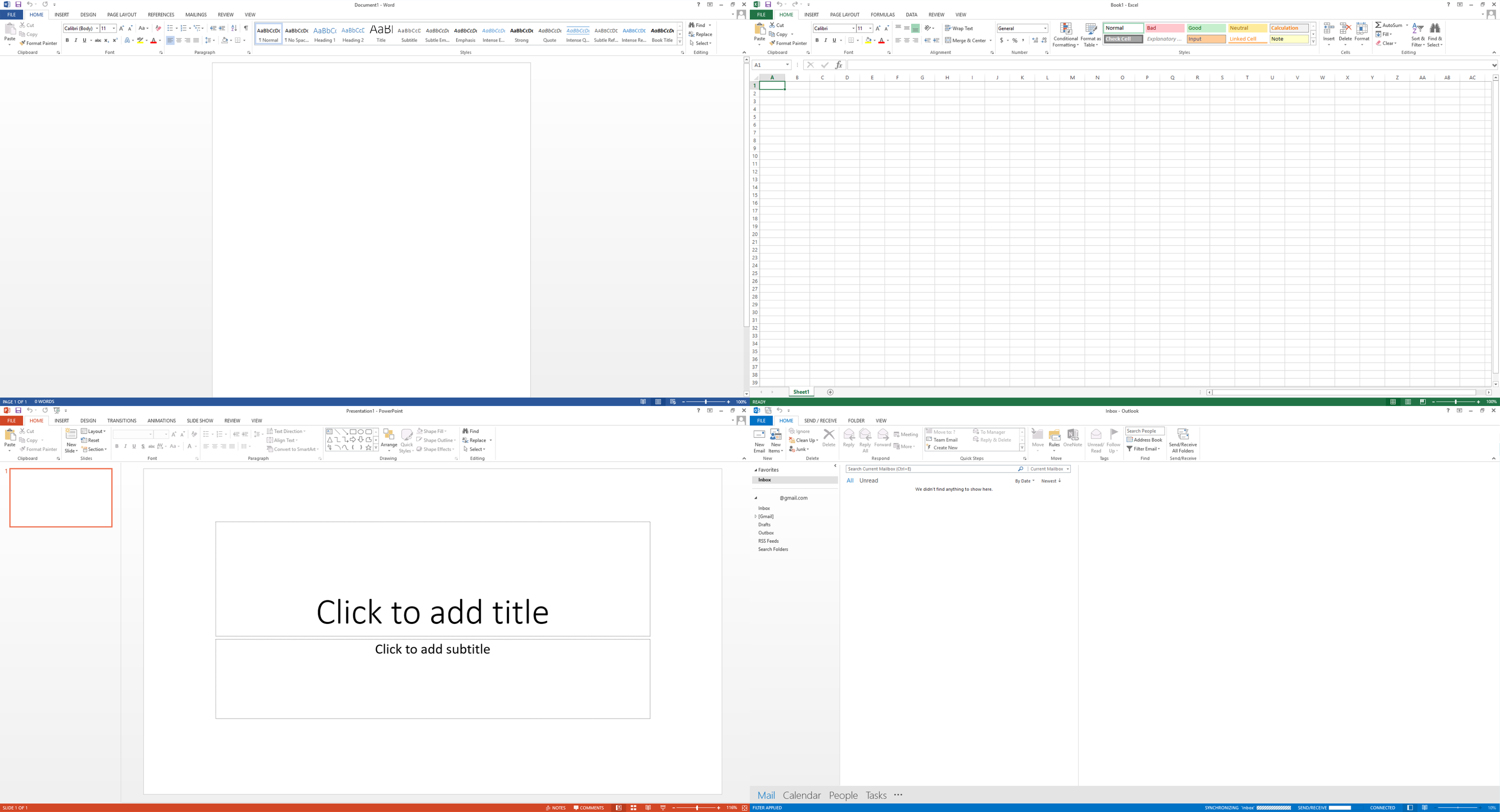
Four screenshots of Microsoft Office 2013 apps, clockwise from top left: Word, Excel, Outlook and PowerPoint. The apps are being used as per their intentional uses in each of the screenshots, rather than the default starting screens, to illustrate the uses of each of the applications. Each screenshot is accompanied by each of their respective icons, shown in Windows. Used with permission from Microsoft. |
|---|---|
| Source |
Screenshots taken from a Windows 10 computer and uploaded by Philip Terry Graham, updated recently by Paowee. |
| Date |
Updated version: September 2, 2024, old version: August 8, 2015 |
| Author | |
| Portion used |
Full screenshots of all four software are used. |
| Low resolution? |
The screenshots are of original resolution, therefore not low resolution. The text would be illegible upon downsizing. |
| Other information |
The Outlook part of this screenshot has been slightly altered, to remove any personal info shown. |
Licensing
edit


Microsoft product screenshot, used with permission from Microsoft.
This image is a copyrighted screenshot of a commercially released computer software product owned by Microsoft Corporation. Microsoft Corporation allows screenshots of its commercially released computer software products for use in advertising, documentations, educational materials, videos and web sites as long as they are not obscene or pornographic, are not disparaging, defamatory, or libelous to Microsoft, and are not digitally altered (except for being resized).
However, the use of this screenshot in Wikipedia must comply with Wikipedia's non-free content criteria policy, because the license forbids derivative works. Images that do not comply may be nominated for deletion.
- Requirements for allowed uses
- For permission to be granted by Microsoft for any uses allowed by these guidelines, you must comply with the following four requirements:
- If your use includes references to a Microsoft product, you must use the full name of the product. When referencing any Microsoft trademarks, follow the General Microsoft Trademark Guidelines.
- You may link to content from Microsoft by using either a plain text link with words such as "This way to Microsoft.com" or by participating in an applicable Link Logo program. No other images may be used as a link to a Microsoft site.
- You must include this following statement: "Used with permission from Microsoft."
- Your use may not be obscene or pornographic, and you may not be disparaging, defamatory, or libelous to Microsoft, any of its products, or any other person or entity.
- Screenshots
- If you wish to benefit from Microsoft's automatic permission grant, you may not use screenshots of Microsoft product boot-up screens, opening screens, "splash screens", or screens from beta release products or other products that have not been commercially released. You may use other screenshots in advertising, in documentation (including educational brochures), in tutorial books, in videotapes, or on Web sites, provided that, in addition to the requirements above, you:
- Do not alter the screenshot except to resize it.
- Do not use portions of screenshots.
- Do not include screenshots in your product user interface.
- Do not use screenshots that contain third-party content.
- Do not use screenshots that contain an image of an identifiable individual.

This tag must only be used with a non-free license tag and a valid fair use rationale as required by policy.
Use rationale
edit
| Article | |
|---|---|
| Purpose of use |
To illustrate Microsoft Office 2013 for identification and critical commentary. |
| Replaceable? |
Irreplaceable. Microsoft Office 2013 and all its screenshots are properties of Microsoft Corporation and therefore no less-restrictively licensed alternative is available. |
| Article | |
|---|---|
| Purpose of use |
To illustrate Microsoft Office for identification and critical commentary. |
| Replaceable? |
Irreplaceable. Microsoft Office 2013 and all its screenshots are properties of Microsoft Corporation and therefore no less-restrictively licensed alternative is available. |
File history
Click on a date/time to view the file as it appeared at that time.
| Date/Time | Thumbnail | Dimensions | User | Comment | |
|---|---|---|---|---|---|
| current | 08:52, 2 September 2024 | | 3,749 × 2,030 (617 KB) | Paowee (talk | contribs) | Updated screenshot compilation to a more better version, and one that matches non-free no reduce guidelines. |
| 00:01, 5 December 2022 | No thumbnail | 391 × 255 (81 KB) | DatBot (talk | contribs) | Reduce size of non-free image (BOT - disable) | |
| 08:31, 2 December 2022 | No thumbnail | 3,000 × 1,954 (845 KB) | Maanshen (talk | contribs) | Simplified icons | |
| 12:42, 27 December 2016 | No thumbnail | 2,963 × 1,954 (943 KB) | Codename Lisa (talk | contribs) | Far too small. A human must choose a modest size that is enough to maintain a high quality article. | |
| 06:08, 27 December 2016 | No thumbnail | 389 × 256 (92 KB) | Theo's Little Bot (talk | contribs) | Reduce size of non-free image (BOT - disable) | |
| 09:58, 4 December 2016 | No thumbnail | 2,963 × 1,954 (943 KB) | Codename Lisa (talk | contribs) | Far too small. A human must choose a modest size that is enough to maintain a high quality article. | |
| 06:11, 4 December 2016 | No thumbnail | 389 × 256 (92 KB) | Theo's Little Bot (talk | contribs) | Reduce size of non-free image (BOT - disable) | |
| 10:31, 5 August 2015 | No thumbnail | 2,963 × 1,954 (943 KB) | PhilipTerryGraham (talk | contribs) | Minor edits. | |
| 08:35, 5 August 2015 | No thumbnail | 2,963 × 1,954 (885 KB) | PhilipTerryGraham (talk | contribs) | Better arrangement | |
| 08:16, 5 August 2015 | No thumbnail | 2,830 × 1,779 (821 KB) | PhilipTerryGraham (talk | contribs) | Uploading an excerpt from a non-free work using File Upload Wizard |
You cannot overwrite this file.
File usage
The following page uses this file:
